

Email marketing has become one of the most powerful tools in digital marketing due to its direct, personal approach. By sending targeted messages to an audience, businesses can nurture relationships, promote products or services, and engage their customers in a way that is highly measurable. The importance of email marketing lies in its ability to directly reach a person’s inbox, creating an opportunity for meaningful interaction.
Unlike social media platforms where algorithms control reach, emails land directly in a subscriber’s inbox, ensuring a higher chance of engagement. For businesses, email marketing also offers a cost-effective way to communicate with a large audience, driving a high return on investment (ROI). It enables companies to build brand loyalty, stay top-of-mind with customers, and convert leads into sales through consistent communication.
Zoho Marketing Automation is a powerful platform that simplifies the process of creating, managing, and optimizing email marketing campaigns. As part of Zoho’s suite of tools, it provides users with an array of features to streamline their marketing efforts. With pre-built email templates, automation workflows, and advanced segmentation, Zoho Marketing Automation makes it easier for businesses to reach the right audience with personalized content.
The platform also integrates with other Zoho applications, such as Zoho CRM, which enhances customer relationship management and helps marketers deliver more targeted messages. This tool helps automate repetitive tasks like email sends, follow-ups, and segmentations, freeing up time for marketers to focus on strategy and content. In short, Zoho Marketing Automation is designed to take the hassle out of email marketing, making it more efficient, effective, and data-driven.
The purpose of this blog is to guide beginners step-by-step through the process of creating their very first email campaign using Zoho Marketing Automation. This post aims to break down the process into simple, digestible sections, from setting up an account to launching and analyzing your email campaign. Whether you’re new to Zoho Marketing Automation or email marketing in general, this guide will help you navigate the platform and get started with confidence. By the end of this blog, you will have the knowledge and skills to create a successful email campaign, track its performance, and refine your strategy for future campaigns.
Overview of Zoho Marketing Automation Platform
Zoho Marketing Automation is an all-in-one platform designed to help businesses automate and streamline their marketing efforts, specifically focusing on email marketing, lead generation, and customer engagement. The platform allows businesses to manage various aspects of their marketing from a single interface, making it easier to design, implement, and track campaigns. Zoho Marketing Automation integrates with other Zoho applications, such as Zoho CRM, to provide a unified marketing ecosystem that enhances the personalization and relevance of your campaigns. With its intuitive user interface and powerful tools, it caters to marketers of all experience levels, offering features that range from basic automation to advanced analytics.
Key Features that Make It Suitable for Email Campaigns
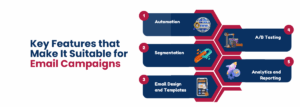
Zoho Marketing Automation is tailored for businesses looking to run email marketing campaigns effectively. Some of the key features that make it particularly suitable for email campaigns include:
-
Automation-
Zoho Marketing Automation allows you to automate the entire email marketing process. You can set up triggers, create workflows, and automate follow-up emails, ensuring timely and personalized communication with your audience. For instance, if a user subscribes to your list, they can automatically receive a welcome email without you having to manually send it.
-
Segmentation-
The platform lets you segment your audience based on specific criteria such as demographics, behavior, past interactions, or purchase history. This enables you to send targeted, relevant emails to different segments, increasing engagement and conversion rates. For example, you can send product recommendations to customers who have previously purchased similar items.
-
Email Design and Templates-
Zoho offers an easy-to-use email builder with pre-designed templates, making it easy to create professional-looking emails without needing design skills. You can customize templates to align with your brand’s look and feel.
-
A/B Testing-
With A/B testing, you can experiment with different subject lines, email content, and designs to determine which version resonates best with your audience. This helps in optimizing email performance for better results.
-
Analytics and Reporting-
Zoho provides in-depth analytics on your email campaigns, including open rates, click-through rates, conversion rates, and more. These insights help you understand how your emails are performing and where improvements can be made. You can track both individual email campaigns and long-term trends, allowing you to continuously refine your approach.
Benefits of Using Zoho Marketing Automation for Email Marketing
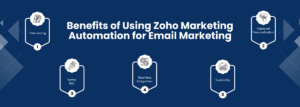
Zoho Marketing Automation offers several benefits for businesses looking to optimize their email marketing efforts:
-
Time-saving-
By automating repetitive tasks such as sending follow-up emails, managing workflows, and segmenting audiences, Zoho saves marketers time, allowing them to focus on more strategic tasks like content creation and campaign planning.
-
Improved Personalization-
The platform’s segmentation and automation features enable marketers to send highly personalized emails based on customer data. This can lead to more meaningful interactions, higher engagement, and ultimately, better conversion rates.
-
Better ROI-
With features like advanced segmentation, A/B testing, and performance tracking, Zoho helps marketers fine-tune their campaigns to get the best results. This ultimately leads to a better return on investment, as you can focus resources on what works best.
-
Seamless Integration-
Zoho Marketing Automation integrates seamlessly with other Zoho products and third-party applications like Google Analytics, helping businesses create a cohesive marketing strategy. This integration ensures a smooth flow of data between platforms, enhancing campaign effectiveness.
-
Scalability-
Whether you’re just starting with email campaigns or running large-scale campaigns, Zoho Marketing Automation can scale with your business needs. It’s a versatile tool that adapts to your growing requirements, making it suitable for both small businesses and larger enterprises.
Signing Up for Zoho Marketing Automation
To get started with Zoho Marketing Automation, the first step is to sign up for an account. This is a straightforward process that typically involves visiting Zoho’s website and selecting the “Sign Up” option for Zoho Marketing Automation. You will need to provide basic information such as your name, email address, and company details. Once registered, you may be asked to select a pricing plan based on the features you need, or you can start with a free trial if you want to explore the platform before committing. After signing up, you will receive a confirmation email, and you’ll be able to log in to your new Zoho Marketing Automation account and start setting it up.
Setting Up Your Account and Preferences

Once you’ve created your Zoho Marketing Automation account, the next step is to configure your account and set your preferences. The platform provides an easy-to-follow onboarding process that will guide you through the basic setup. Some of the essential tasks to complete during this stage include:
-
Branding Your Account-
This involves uploading your company’s logo and choosing the color scheme that aligns with your brand. Branding your account helps maintain consistency across your email campaigns and other marketing efforts.
-
Setting Up Email Sender Details-
You will need to configure the email address and domain you’ll use for sending out campaigns. This ensures that your emails look professional and come from a trusted source. Zoho also allows you to set up authentication settings, like SPF, DKIM, and DMARC, to ensure better email deliverability.
-
Configuring Your Preferences-
Customize your account preferences to define how you want notifications, reports, and insights to be displayed. You can also set up time zones, languages, and default settings for email campaigns to ensure they align with your business operations.
-
Connecting Your Email List-
Import your existing email list into Zoho Marketing Automation, either by uploading a CSV file or connecting it with a CRM, spreadsheet, or other sources. This allows you to start sending campaigns to your subscribers immediately.
Integrating Zoho Marketing Automation with Your Website and Other Tools (CRM, eCommerce, etc.)
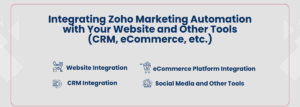
To maximize the effectiveness of Zoho Marketing Automation, it’s important to integrate the platform with your website and other key business tools. These integrations enable seamless data sharing between platforms, allowing you to run more targeted and efficient email campaigns. Some common integrations include:
-
Website Integration-
Zoho Marketing Automation can be integrated with your website to track user behavior, such as which pages they visit, what actions they take, and their interactions with your content. By embedding tracking code or using a plugin, Zoho can capture this data and allow you to segment your audience and trigger automated campaigns based on specific user actions (e.g., sending a follow-up email when a user abandons their cart).
-
CRM Integration-
Zoho Marketing Automation integrates seamlessly with Zoho CRM (as well as other third-party CRMs like Salesforce). This integration ensures that your marketing and sales data are synchronized, allowing you to send highly personalized and targeted emails based on customer data, such as purchase history or contact information. By connecting Zoho CRM with the marketing automation platform, you can automate lead nurturing, follow-ups, and track customer interactions.
-
eCommerce Platform Integration-
If you run an eCommerce business, Zoho Marketing Automation can integrate with platforms like Shopify, WooCommerce, and others. This integration allows you to send personalized product recommendations, abandon cart emails, and post-purchase follow-ups to your customers based on their browsing and purchasing behavior. It also helps in segmenting your email list based on shopping activity, such as frequent buyers or high-spending customers.
-
Social Media and Other Tools-
Zoho Marketing Automation can also be connected to your social media accounts and other tools like Google Analytics, enabling you to track and measure the success of campaigns across multiple channels. By integrating these platforms, you get a more holistic view of your marketing efforts and can refine your strategies for better results.
By integrating Zoho Marketing Automation with your website and other business tools, you can create a seamless, data-driven marketing experience. This ensures that your email campaigns are more relevant, targeted, and timely, ultimately improving customer engagement and driving better results.
In summary, getting started with Zoho Marketing Automation involves creating an account, setting up your preferences and branding, and then integrating the platform with your website and other essential business tools. These initial steps will ensure you have a solid foundation for running effective email campaigns and help you leverage all the features of Zoho Marketing Automation for greater success in your marketing efforts.
Step 1- Defining Your Campaign Goals
Before creating your first email campaign, it’s essential to define clear objectives. Decide what you want to achieve with the campaign, such as lead generation, nurturing existing leads, or driving sales. Identifying the goal helps shape your strategy and messaging. Additionally, choose the right type of campaign based on your objective, like a welcome email for new subscribers, a promotional email to advertise a product, or a newsletter to engage your audience with regular updates.
Step 2- Audience Segmentation
Audience segmentation is crucial for creating targeted and personalized email campaigns. By dividing your email list into smaller groups based on specific characteristics or behaviors, you can ensure that your messages resonate with each segment more effectively.
To create and segment your email list, consider factors like behavior (e.g., past purchases or website interactions), interests (e.g., product preferences or content engagement), and demographics (e.g., age, location, or job role). This allows you to send more relevant and tailored emails, increasing engagement and conversions by addressing the unique needs and interests of each group.
Step 3- Designing the Email
When designing your email, you can either choose a pre-designed template or create a custom design to match your brand. Templates are often quicker and easier to use, but custom designs allow more flexibility and creativity.
To ensure your email is effective, it’s important to make it visually appealing and mobile-friendly. Use clear, attractive visuals, concise text, and a clean layout. Since many people read emails on mobile devices, make sure your email adjusts well to different screen sizes, with legible fonts, properly aligned content, and easy-to-click buttons.
Additionally, writing compelling subject lines is crucial as they determine whether your email gets opened. The subject line should be short, attention-grabbing, and reflect the content of the email. For the email copy, focus on clarity and value—highlight benefits, use a friendly tone, and include a clear call-to-action (CTA) to encourage the reader to take the desired next step.
Step 4- Personalization and Dynamic Content
Personalization is a powerful way to make your emails feel more relevant and engaging to the recipient. Personalization tokens, such as the recipient’s name, company, or other details, can be inserted into the email to make it feel more personal and less generic. For example, addressing the recipient by their first name in the subject line or greeting can create a more personalized experience.
In addition to basic personalization, dynamic content blocks allow you to tailor the email’s content based on the recipient’s behavior or attributes. For example, you can show different product recommendations, offers, or messaging based on a customer’s past purchases, location, or interests. By using dynamic content, you can send emails that feel uniquely relevant to each person, improving engagement and increasing the chances of conversions.
Step 5- Testing and Previewing Your Email Campaign
Testing is a crucial step to ensure that your email campaign is effective and free of errors. A/B testing allows you to experiment with different subject lines, email copy, or designs to see which version performs best. Email previews let you view how your email will look across various devices (desktop, mobile, etc.) and email clients, ensuring that it looks good for all recipients.
Before sending your email, thoroughly preview and test it by sending test emails to yourself or a small group. This helps you spot any issues, such as broken links, typos, or formatting errors. Checking these details ensures a professional, error-free email and improves the chances of it being well-received by your audience.
Step 6- Launching Your Campaign
Once your email is tested and ready to go, it’s time to launch. First, consider the best time to send your campaign—this can depend on factors like your audience’s time zone, behavior, and industry. You may want to analyze past campaigns or use Zoho’s built-in analytics to identify the optimal send time.
Before launching, perform a final review of your campaign to ensure everything is in order: verify personalization, test links one last time, and double-check your subject lines and content. Once you’re confident, click “send” to launch the campaign. After sending, you can monitor the progress through Zoho’s reporting tools, tracking key metrics like open rates, click-through rates, and bounce rates to gauge the success of the campaign.
Introduction to Zoho Marketing Automation’s Analytics and Reporting Features
Zoho Marketing Automation offers a comprehensive suite of analytics and reporting tools that help you track the effectiveness of your email campaigns. These features give you valuable insights into how your emails are performing, allowing you to make data-driven decisions and optimize your marketing strategy. The platform provides a user-friendly dashboard where you can view key metrics in real-time, as well as detailed reports that highlight the success of your campaigns and offer suggestions for improvements. Whether you’re a beginner or a seasoned marketer, these analytics tools make it easy to understand your campaign’s impact and refine your efforts.
Key Metrics to Track (Open Rates, Click-Through Rates, Conversions)
When evaluating the success of your email campaigns, there are several important metrics to monitor:
-
Open Rates-
This metric tells you the percentage of recipients who opened your email. A high open rate usually indicates that your subject line was compelling and that your audience is interested in your content. It’s a good starting point for understanding engagement.
-
Click-Through Rates (CTR)-
This measures how many people clicked on links or calls-to-action (CTAs) within your email. CTR helps you gauge the effectiveness of your email’s content, design, and offers. A higher CTR means your email’s content was engaging and prompted action.
-
Conversions-
Conversion rates show how many recipients took the desired action after clicking on a link or CTA in your email (such as making a purchase or filling out a form). This is one of the most important metrics because it directly reflects the effectiveness of your email in driving business goals.
Making Adjustments Based on Performance Data
Once you’ve reviewed your campaign’s performance, it’s essential to make adjustments based on the data. If your open rates are low, consider revising your subject line to make it more compelling. If the CTR is lower than expected, you may need to improve the content or CTA, ensuring that they are clear, relevant, and enticing. Similarly, if conversions are lacking, you might want to adjust your offers, landing pages, or follow-up emails.
By regularly monitoring these metrics and making necessary changes, you can continuously improve the effectiveness of your email campaigns, ensuring better engagement and higher ROI over time. Zoho’s analytics and reporting tools provide the insights needed to test, optimize, and refine your strategies for ongoing success.
Analyzing Campaign Performance
After your campaign is live, it’s important to analyze its performance. Zoho Marketing Automation provides detailed analytics and reports that help you understand how well your email performed. Focus on key metrics like open rates, click-through rates, conversion rates, and unsubscribe rates. These insights can help you assess what worked well and identify areas for improvement.
By analyzing campaign performance, you can refine your strategies for future emails, optimize your subject lines, content, and design, and ultimately improve the effectiveness of your email marketing efforts. Continuous analysis ensures you’re always learning and improving your email campaigns.
Conclusion
In conclusion, Zoho Marketing Automation is a powerful tool for anyone looking to create, manage, and optimize email campaigns effectively. By following the steps outlined—defining your goals, segmenting your audience, designing engaging emails, and utilizing personalization—you can craft campaigns that resonate with your audience. The platform’s robust analytics and reporting features further help you track key metrics like open rates, click-through rates, and conversions, providing you with the insights necessary to refine and improve your campaigns over time. With Zoho Marketing Automation, you can take the guesswork out of email marketing, ensuring that your campaigns are targeted, efficient, and result-driven. Whether you’re just getting started or looking to enhance your current strategy, Zoho offers the tools you need for sustained success in email marketing.
