

1. Overview of Zoho Marketing Automation
Zoho Marketing Automation is an all-in-one platform designed to streamline digital marketing processes. It enables businesses to manage campaigns, track customer engagement, and automate workflows efficiently. With its robust features, such as lead nurturing, email marketing, social media management, and analytics, the platform helps businesses drive conversions while optimizing their marketing strategies.
Importance of Customization in Marketing Automation
Customization is essential in marketing automation because no two businesses have the same needs or customer journeys. A one-size-fits-all approach often leads to inefficiencies, missed opportunities, and irrelevant messaging. By tailoring automation settings to fit specific business goals, marketers can ensure their campaigns resonate with their target audience, improve engagement, and increase overall marketing ROI.
How Customization Enhances Efficiency and Personalization
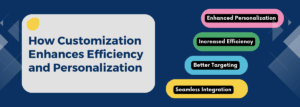
Customization allows businesses to create personalized experiences for their audience while optimizing internal workflows. Some key benefits include:
-
Enhanced Personalization-
Customized email templates, dynamic content, and personalized customer journeys improve engagement rates.
-
Increased Efficiency-
Automated workflows tailored to specific business needs reduce manual tasks, saving time and resources.
-
Better Targeting-
Custom lead scoring and segmentation ensure that marketing efforts are focused on the right audience.
-
Seamless Integration-
Custom API settings and integrations with CRM tools enhance data flow and improve campaign effectiveness.
2. Accessing Customization Settings in Zoho Marketing Automation
Customization settings in Zoho Marketing Automation allow businesses to tailor their marketing workflows, audience segmentation, and automation processes to match their unique needs. Accessing these settings is the first step in optimizing the platform for personalized marketing strategies.
Navigating to the Settings Panel
To access customization settings in Zoho Marketing Automation, follow these steps:
-
Log in to Zoho Marketing Automation using your credentials.
-
Click on the gear icon (⚙️) or ‘Settings’ in the top-right corner of the dashboard.
-
From the Settings panel, explore different customization options available under various sections, including Leads, Campaigns, Email Settings, and Integrations.
Overview of Key Customization Sections
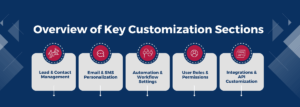
Once inside the settings panel, users can modify and configure multiple aspects of their marketing automation. Key customization sections include:
-
Lead & Contact Management
-
-
Create and manage custom fields to capture unique data.
-
Define lead scoring rules to prioritize high-value leads.
-
Set up custom tags and segmentation for targeted marketing.
-
-
Email & SMS Personalization
-
-
Customize email templates with dynamic content.
-
Configure email sender settings and domain authentication (SPF, DKIM).
-
Personalize SMS templates for direct customer communication.
-
-
Automation & Workflow Settings
-
-
Design custom workflows based on triggers and customer actions.
-
Modify journey builder settings to create tailored customer journeys.
-
Adjust workflow rules for better process automation.
-
-
User Roles & Permissions
-
-
Assign specific roles and permissions to team members.
-
Define access levels to maintain security and control over automation settings.
-
-
Integrations & API Customization
-
-
Connect with Zoho CRM and other third-party tools for seamless data sync.
-
Use API settings for advanced customization and external integrations.
-
3. Key Customization Features in Zoho Marketing Automation
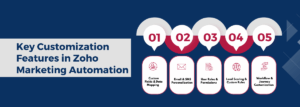
Customization in Zoho Marketing Automation allows businesses to tailor their marketing strategies, automate processes, and enhance engagement through personalized interactions. Below are the key customization features available in the platform:
a) Custom Fields & Data Mapping
Creating and Managing Custom Fields
Custom fields help businesses collect and store unique data that may not be available in default fields. This allows for better tracking, segmentation, and targeting.
-
Users can add custom fields under Leads, Contacts, and Accounts to store specific details such as industry type, lead source, or purchase history.
-
Custom fields can be of different types, including text, number, dropdown, date, and checkbox, depending on the required data format.
Mapping Custom Data for Better Segmentation
Data mapping ensures that lead information is properly categorized for better segmentation and targeted marketing.
-
Users can map custom fields to Zoho CRM or third-party integrations to maintain consistency across platforms.
-
Properly mapped data enables businesses to create personalized marketing campaigns based on customer attributes.
b) Email & SMS Personalization
Customizing Email Templates and Dynamic Content
Personalized emails improve customer engagement by delivering tailored messages.
-
Users can customize email templates with branded elements, call-to-action buttons, and images.
-
Dynamic content blocks allow emails to change based on recipient data, such as location, preferences, or past interactions.
-
A/B testing can be used to determine the best-performing email versions.
Setting Up SMS Personalization Rules
Personalized SMS campaigns help businesses connect with customers directly.
-
SMS messages can be customized with merge tags to include names, purchase details, or promotional offers.
-
Users can define rules for automated SMS triggers, such as abandoned cart reminders, event confirmations, or follow-ups.
c) User Roles & Permissions
Configuring Access Control for Teams
Zoho Marketing Automation allows businesses to control access levels to maintain security and streamline collaboration.
-
Admins can create custom roles such as Marketing Manager, Content Creator, or Analyst to limit access based on job responsibilities.
-
Certain settings, such as email lists, automation workflows, and analytics, can be restricted to prevent unauthorized changes.
Managing Roles for Different Marketing Tasks
-
Team members can be assigned permissions for campaign creation, lead management, reporting, and integrations.
-
Access control ensures that sensitive data, such as lead scoring rules and customer databases, is only modified by authorized users.
d) Lead Scoring & Custom Rules
Defining Criteria for Lead Qualification
Lead scoring helps prioritize leads based on their likelihood to convert.
-
Users can define lead scores based on email interactions, website visits, form submissions, and engagement levels.
-
Positive actions (e.g., clicking a link in an email) can increase a lead’s score, while negative actions (e.g., unsubscribing) can decrease it.
Automating Actions Based on Lead Scores
-
High-scoring leads can be automatically assigned to the sales team for follow-ups.
-
Leads below a certain threshold can be nurtured with email sequences before moving to the sales pipeline.
-
Automated workflows can trigger specific actions, such as sending offers to engaged leads or scheduling sales calls for warm prospects.
e) Workflow & Journey Customization
Building Custom Automation Workflows
Automation workflows allow businesses to create predefined sequences of actions based on customer behavior.
-
Users can build workflows for welcome emails, drip campaigns, re-engagement emails, and sales follow-ups.
-
Workflows can include conditional triggers, such as sending a follow-up email if a lead opens a campaign but does not click.
Setting Up Triggers and Conditions for Customer Journeys
-
Triggers initiate automation based on customer actions, such as website visits, form submissions, or email clicks.
-
Businesses can create multi-step customer journeys, where different interactions trigger unique responses.
-
Conditional logic allows marketers to branch workflows based on customer behavior (e.g., sending different emails to engaged vs. inactive users).
4. Integrations & API Customization
Integrations and API customization in Zoho Marketing Automation allow businesses to seamlessly connect their marketing processes with other tools, enhancing data flow, automation, and overall efficiency. This ensures that marketing efforts are aligned with sales, customer support, and analytics for a cohesive business strategy.
Connecting Zoho Marketing Automation with Other Zoho Apps
Zoho’s ecosystem includes a variety of apps for CRM, analytics, finance, and customer support. Integrating Zoho Marketing Automation with these apps helps streamline workflows and centralize customer data.
Key Zoho Integrations-

-
Zoho CRM –
Sync leads, contacts, and deals between Zoho Marketing Automation and Zoho CRM to maintain an updated sales pipeline and trigger marketing actions based on sales activities.
-
Zoho SalesIQ –
Track visitor interactions on your website and engage with leads in real-time via chatbots and live chat.
-
Zoho Analytics –
Generate custom reports and dashboards to measure campaign performance and ROI.
-
Zoho Campaigns –
Sync email lists and contacts to create personalized email marketing campaigns based on user behavior.
-
Zoho Forms –
Capture leads through online forms and automate follow-up actions in Zoho Marketing Automation.
-
Zoho Desk –
Improve customer experience by integrating support ticketing with marketing automation to send follow-up emails, feedback forms, and service updates.
Seamless integration across Zoho applications ensures that data flows smoothly, reducing manual work and improving marketing efficiency.
5. Using APIs for Advanced Customization
For businesses that require deeper customization beyond built-in integrations, Zoho provides APIs (Application Programming Interfaces) to connect third-party applications, custom software, and external databases.
Key Benefits of API Customization-
Custom Data Syncing –
Sync customer data from external platforms like eCommerce stores, ERP systems, or third-party CRMs.
Automated Workflows –
Use API calls to trigger automated email sequences, lead updates, or notifications based on customer actions.
Personalized Campaigns –
Fetch real-time data (e.g., purchase history, product usage) to personalize marketing messages.
Multi-Platform Integration –
Connect with external tools like Slack, Zapier, Google Analytics, and social media platforms.
Examples of API Customization in Zoho Marketing Automation-
-
Custom Lead Scoring-
Pull engagement data from third-party platforms (like a webinar tool) and assign scores to leads based on interactions.
-
eCommerce Integration-
Automatically send cart abandonment emails by integrating with Shopify or WooCommerce via API.
-
Real-Time Notifications-
Trigger SMS alerts, push notifications, or chatbot responses based on specific customer actions.
By leveraging Zoho’s integrations and API customization, businesses can create a fully connected marketing ecosystem that automates tasks, improves customer engagement, and drives conversions more effectively.
6. Conclusion
Customization in Zoho Marketing Automation is a powerful tool that enhances efficiency, improves targeting, and streamlines marketing efforts. Our marketing automation agency helps businesses from creating custom fields and data mapping for better segmentation to personalizing emails and SMS, to tailor their campaigns for maximum impact. Features like user roles and permissions ensure secure collaboration, while lead scoring and automation rules help prioritize high-quality leads. Additionally, workflow and journey customization enable businesses to design seamless customer experiences, and API integrations allow for enhanced connectivity with other platforms.
By leveraging these customization options, businesses can create more personalized, data-driven marketing strategies that increase engagement and conversions. Automation reduces manual tasks, freeing up valuable time while improving efficiency. Integrating Zoho Marketing Automation with CRM, analytics, and other tools further optimizes workflows, ensuring a seamless marketing ecosystem. Businesses that take full advantage of these settings will not only enhance customer relationships but also drive sustainable growth through smarter, more adaptive marketing practices.
