

Professional services firms operate in a fundamentally different world than product companies. Revenue doesn’t come from shelf inventory; it comes from hours, expertise, and relationships. Which means every dropped lead, every manual invoice, every missed follow-up, and every unbillable hour isn’t just an inconvenience. It’s money walking out the door.
That’s exactly why Zoho for Professional Services has become one of the most sought-after implementations in the consulting, legal, accounting, engineering, and staffing verticals. Zoho doesn’t offer a single tool; it offers a tightly integrated ecosystem that covers the entire client lifecycle: from the first website visit to the final invoice.

Why Zoho Fits Professional Services Better Than You Think

Most CRMs are built for simple sales cycles, but professional services require seamless coordination between sales, delivery, and zoho finance. Without a connected system, data gets lost between teams.
The Zoho client management system solves this by unifying operations through Zoho One for Professional Services, giving access to 45+ apps under one ecosystem.
KEY ADVANTAGES:
Unified client record
One record across CRM, Projects, Books, and Desk, no duplicate entries or data silos.
End-to-end automation
Zoho workflow automation routes leads, triggers proposals, and escalates at-risk accounts.
Real-time analytics
Zoho Analytics utilization tracking surfaces billable vs. non-billable hours by team or client.
Automated billing
Zoho billing and invoicing converts approved timesheets directly into client invoices.
Lead Management & Automation: Where the Money Starts
Many firms struggle not because of poor sales skills, but because of disorganized lead management. Leads come from multiple channels and often end up scattered.
Zoho CRM for professional services centralizes all leads into a single system, capturing them through web forms, LinkedIn, and Zoho SalesInbox so nothing slips through the cracks.
With Zoho workflow automation for services firms, lead qualification becomes structured and consistent.
Leads are scored based on:
-
Company size: Larger organizations are prioritized as they typically bring higher-value engagements.
-
Industry fit: Leads are matched against your ideal client profile to ensure better conversion rates.
-
Service type requested: High-margin services can be prioritized over lower-value engagements.
-
Engagement behavior: Website visits, time spent, and interactions indicate how serious the prospect is.
-
Lead source: Referrals and warm leads are ranked higher than cold inbound inquiries.
Pipeline Stages Designed for Consulting Engagements
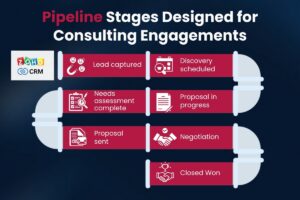
A generic pipeline doesn’t reflect real consulting workflows. A structured Zoho CRM for professional services pipeline ensures each stage is clearly defined and actionable.
Typical pipeline stages:
-
Lead captured: The system instantly sends an acknowledgment, ensuring quick response times and better first impressions.
-
Discovery scheduled: Meetings are automatically booked using Zoho Bookings, reducing back-and-forth communication.
-
Needs assessment complete: Zoho Blueprint ensures all required details are captured before moving forward.
-
Proposal in progress: Documents are generated using Zoho Writer and prepared for approval.
-
Proposal sent: Automated follow-ups ensure the deal doesn’t go cold.
-
Negotiation: Discounts and approvals are tracked with built-in workflows.
-
Closed Won: A project is automatically created in Zoho Projects with predefined templates for delivery.
This structured approach reduces delays and improves conversion rates.
Zoho Workflow Automation for Services Firms
The marketing planner in Zoho Marketing Automation allows businesses to structure their marketing efforts by creating detailed plans. A well-defined plan helps align goals, manage budgets, and ensure smooth execution across teams.
Setting Up a New Marketing Plan
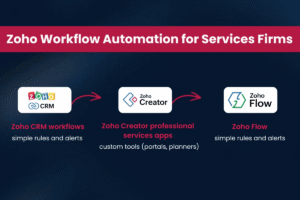
Automation layers:
-
Zoho CRM workflows → simple rules and alerts
-
Zoho Creator professional services apps → custom tools (portals, planners)
-
Zoho Flow → integrates external tools like Slack, QuickBooks
This layered approach allows firms to scale automation as complexity grows.
From Won Deal to Delivered Work: Projects, Time Tracking & Billing
Many systems fail after the deal is closed, but Zoho ensures a smooth transition from sales to execution and billing.
A complete Zoho project management services firms stack includes Zoho CRM, Zoho Projects, and Zoho Books, all working together.
Zoho time tracking software helps teams log hours accurately while supporting multiple billing models:
-
Fixed fee projects: Progress is tracked against the total budget, helping prevent overruns.
-
Time & materials: Hours are billed based on actual work done, ensuring accurate revenue capture.
-
Retainers: Clients are billed monthly with a predefined hours allocation.
-
Not-to-exceed: Alerts are triggered as projects approach budget limits.
With Zoho Books for consulting firms, invoicing becomes seamless:
-
Approved timesheets are automatically converted into invoices.
-
Multi-currency billing supports international clients.
-
Expenses and reimbursements are tracked within the system.
-
Automated reminders improve payment collection speed.
This eliminates manual billing errors and improves cash flow.
Automation is a key feature of Zoho Marketing Automation, allowing businesses to streamline their marketing processes, reduce manual efforts, and ensure consistency across multiple channels. With automation, marketing teams can focus on strategy while Zoho handles execution.
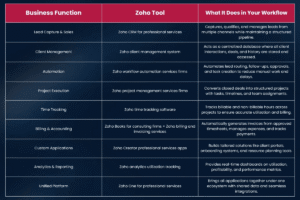
Zoho Tools & Their Role in Professional Services
Zoho Analytics: Utilization Tracking That Actually Drives Decisions
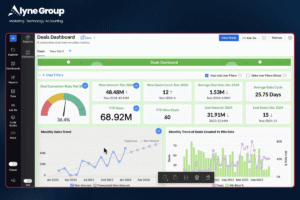
Revenue per employee, billable utilization rate, realization rate, client profitability, these are the KPIs that determine whether a professional services firm grows or stagnates. Most firms have this data scattered across four different systems, which means by the time someone builds the report, it’s already three weeks old.
Zoho Analytics utilization tracking changes this by creating a unified data layer across Zoho Projects, Zoho Books, and Zoho CRM. With pre-built connectors, your analytics dashboards pull live data and display it in real time, no data warehouse, no BI team, no waiting.
For a professional services firm, the critical dashboards to build in Zoho Analytics include:
-
Billable utilization by team member — hours billed vs. hours available, filtered by role, department, or client
-
Pipeline-to-capacity forecast — upcoming closed deals mapped against available consultant hours to identify future bottlenecks
-
Client profitability report — revenue vs. cost of delivery by engagement, revealing which clients are actually profitable
-
Realization rate tracking — billed hours vs. worked hours, identifying scope creep before it erodes margins
The Zoho One Advantage: One Subscription, One Ecosystem
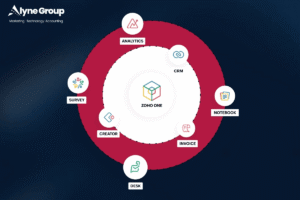
For professional services firms evaluating Zoho, the most important licensing decision is whether to adopt Zoho One for professional services. Zoho One is a single subscription that provides access to over 45 Zoho applications, CRM, Projects, Books, Analytics, Creator, Sign, Campaigns, Desk, People, and more, at a per-user price that’s dramatically lower than licensing each tool separately.
For a 20-person consulting firm that would otherwise need separate subscriptions for a CRM, a project management tool, an accounting platform, an e-signature solution, and an analytics product, Zoho One consolidates that into a single vendor relationship, a single data model, and a predictable per-seat cost.
The deeper value of Zoho One isn’t cost, it’s coherence. When your CRM, your projects, your finance, and your analytics all share the same underlying database, the automations you build become exponentially more powerful. A deal closing in CRM can automatically create a project, assign team members based on availability data from People, generate a kickoff document in Writer, schedule the first client meeting in Calendar, and notify the billing team in Cliq, all in a single workflow trigger.
Implementation Roadmap: What to Do First
One of the most common mistakes in Zoho implementations is trying to configure everything at once. The right approach is to implement in phases, validate adoption at each stage, and expand only when the previous layer is working.
-
Phase 1 CRM foundation (Weeks 1–3): Configure Zoho CRM with your pipeline stages, lead sources, and custom fields. Connect lead capture forms and email integration. Train your sales team on daily use before touching anything else.
-
Phase 2 Automation layer (Weeks 4–6): Build lead scoring rules, pipeline automation workflows, and approval processes in Zoho CRM. Implement Blueprint for pipeline stage enforcement. Connect Zoho Campaigns for automated nurture sequences.
-
Phase 3 Projects & time tracking (Weeks 7–9): Integrate Zoho Projects with CRM. Build project templates for your common engagement types. Roll out Zoho time tracking software to the delivery team. Establish timesheet approval workflow.
-
Phase 4 Billing integration (Weeks 10–12): Configure Zoho Books for consulting firm billing models. Connect Projects-to-Books for automated invoice generation. Set up payment collection and AR automation.
-
Phase 5 Analytics & optimization (Weeks 13–16): Build Zoho Analytics dashboards for utilization, profitability, and pipeline reporting. Identify bottlenecks and optimize workflows. Run first full-cycle review.
Partner note: For firms implementing Zoho One, working with a certified Zoho Consulting Partner significantly accelerates implementation timelines. Partners have access to pre-built templates for services verticals, dedicated support channels, and implementation best practices built from dozens of similar deployments. Many partners also offer Zoho sign-up links on their websites, an easy way to ensure your subscription is correctly credited and you receive implementation support from day one.
Five Mistakes Professional Services Firms Make in Their Zoho Implementation
Having seen dozens of Zoho implementations across consulting, legal, engineering, and accounting firms, here are the patterns that consistently derail projects and how to avoid them.
-
Over-customizing before adoption.
-
Ignoring the CRM-to-Projects hand-off.
-
Not connecting time tracking to billing from day one.
-
Building analytics dashboards before data quality is established.
-
Treating Zoho Creator professional services apps as optional.
Elevate Professional Services with Alyne’s Zoho CRM Expertise
At Alyne, we understand that professional service firms require precision, efficiency, and complete visibility across projects and client interactions. Our tailored approach to Zoho implementation ensures your business leverages the full potential of Zoho CRM solutions, from streamlined Zoho CRM setup to advanced Zoho sales automation and seamless Zoho CRM migration. As a trusted Zoho consulting partner and Zoho CRM partner, we design and deploy scalable systems that align perfectly with your workflows, helping you improve productivity, enhance client management, and drive sustainable growth with confidence.

FAQs: Zoho Implementation for Professional Services
1. What is Zoho CRM implementation for professional services?
Zoho CRM implementation for professional services involves configuring and customizing Zoho CRM to manage leads, clients, projects, and workflows efficiently. It helps service-based businesses streamline operations, improve client relationships, and convert more leads into closed deals.
2. How does Zoho CRM help turn lead chaos into closed deals?
With Zoho sales automation, Zoho CRM organizes your leads, automates follow-ups, and ensures every opportunity is tracked through a structured pipeline. This eliminates missed opportunities and helps your team consistently move prospects toward conversion.
3. Why should I work with a Zoho consulting partner?
A Zoho consulting partner like Alyne ensures your CRM is set up strategically, not just technically. They help customize workflows, implement automation, and align Zoho CRM with your specific business goals for maximum ROI.
4. Can Zoho CRM be customized for different professional service industries?
Yes, Zoho CRM solutions are highly customizable and can be tailored for industries like consulting, legal services, marketing agencies, and more. Workflows, modules, and automation can all be adapted to suit your unique processes.
5. How long does Zoho CRM implementation take?
The timeline for Zoho CRM setup depends on the complexity of your requirements. A basic setup may take a few days, while a fully customized implementation with automation and integrations can take a few weeks.
