/

AI

/

AI Workflow Automation

Turn Manual Processes Into Automated Systems With AI Workflow Automation

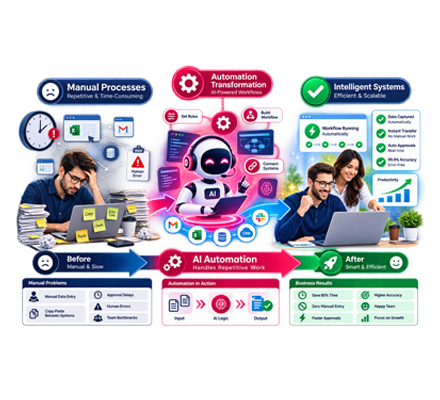
Your team shouldn’t have to spend hours copying information, chasing follow-ups, updating records, or moving tasks from one system to another. AI workflow automation can take over those repetitive steps and keep work moving with less manual involvement.

At Alyne, we design automation around your actual business processes. We connect the platforms you already use, add AI where it can make decisions or handle information, and create workflows that reduce busywork without forcing your team to change everything they already do.

Businesses That Trust Us With AI Workflow Automation

Businesses choose Alyne to automate repetitive processes, connect their existing systems, and create more efficient workflows without disrupting the way their teams already work.
Two Brothers Organic Farms
Riskwell
Reencle
Quality Plumbing Services
Paul Brothers Heating & Air
MAD Roofing
Kerrigan Roofing & Restoration
GigaStar
Ecocane
Eagle Eye Roofing
Adlib Advertising
Two Brothers Organic Farms
Riskwell
Reencle
Quality Plumbing Services
Paul Brothers Heating & Air
MAD Roofing
Kerrigan Roofing & Restoration
GigaStar
Ecocane
Eagle Eye Roofing
Adlib Advertising
Every business has different processes, software, and bottlenecks. We don’t start with a fixed automation package. We look at how work currently moves through your business and determine which steps can be streamlined, connected, or handled automatically.

Our AI workflow automation can help you:

Reduce repetitive administrative work

Eliminate unnecessary data entry

Keep information synchronized across platforms

Trigger tasks and follow-ups automatically

Route information to the right person or system

Improve consistency across everyday processes

AI Automation Built for the Way Your Team Works

AI Automation Built for the Way Your Team Works

Where Workflow Automation Creates Measurable Gains

The right automation can improve more than productivity. It can help your team respond sooner, reduce process errors, and spend more time on work that actually requires human attention.
30–50%
Faster Response Times
Automated workflows can move leads, requests, and information to the next step without waiting for someone to handle them manually.
10+
Hours Reclaimed Each Week
Take repetitive tasks off your team’s plate so employees can focus on customers, projects, and higher-value responsibilities.
20+
Workflows Automated
Automate processes across sales, customer service, operations, administration, and other areas of the business.
5+
Business Systems Connected
Bring your CRM, scheduling tools, communication platforms, and other software into a connected workflow.
24/7
Process Execution
Automated workflows can continue processing tasks and triggering actions even when your team is unavailable.
Continuous Improvement
We review how your automations perform and make adjustments as your workflows and business requirements change.

What We Can Automate Across Your Business

From simple task automation to multi-step processes involving several platforms, we build workflows around the work your team actually needs to get done.
01

Lead Intake & Routing

Capture information from new inquiries, organize incoming leads, assign them to the appropriate team member, and trigger the next step automatically.
02

CRM Updates & Pipeline Management

Keep customer and lead records current by automatically creating records, updating fields, assigning tasks, and moving opportunities through defined stages.
03

Follow-Ups & Customer Communication

Trigger emails, SMS messages, reminders, and other communications based on customer activity, pipeline changes, appointments, or specific time intervals.
04

Data Transfer Between Systems

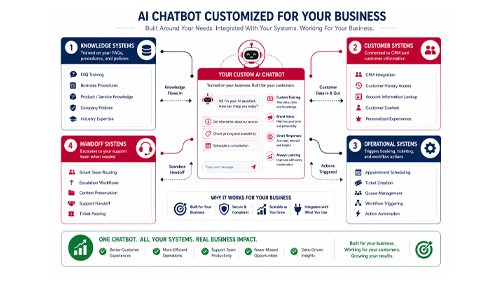
Connect your chatbot with the systems your business already uses. We integrate AI chatbots with CRMs, calendars, help desks, knowledge bases, and other business software so conversations can trigger useful actions.

05

Administrative Workflows

Automate recurring internal tasks such as notifications, approvals, document handling, task creation, and team assignments.
06

AI-Based Information Processing

Use AI to read, categorize, summarize, extract, or interpret information before sending it to the appropriate workflow or team member.
07

Reporting & Alerts

Collect information from different systems, organize it into useful updates, and alert your team when a specific condition requires attention.
08

Custom Business Workflows

Have a process unique to your company? We can design a custom workflow around your software, business rules, and operational requirements.

What Goes Into a Reliable AI Workflow

Good automation isn’t simply connecting two apps. Each workflow needs clear rules, dependable integrations, testing, and ongoing oversight.

Process Discovery

We examine how your team currently completes a task, where information enters the process, and where delays or repetitive work occur.

Workflow & Decision Logic

We map the conditions, actions, approvals, and hand offs, that determine what happens at each stage of the process.

AI Where It Adds Value

AI is introduced where interpretation, classification, summarization, or decision-making can improve the workflow rather than being added simply for the sake of using AI.

Connected Systems

We integrate the workflow with the CRM, communication tools, calendars, databases, and business applications involved in the process.

Real-World Testing

Before deployment, we test different inputs, scenarios, and exceptions to make sure the workflow behaves correctly when conditions don’t follow the ideal path.

Ongoing Monitoring

After launch, we can review performance, identify opportunities for improvement, and adjust workflows as your business changes.

Build Automation Around Your Biggest Bottlenecks

Not every task needs AI, and not every process should be automated. We’ll help you determine where automation can deliver the most practical value.
We’ll look at:

Repetitive tasks taking up employee time

Manual handoffs between teams or systems

Processes that depend on repeated data entry

Customer or lead follow-ups that can be triggered automatically

Systems that need to exchange information

Workflows where AI can help interpret or organize data

What Businesses Say About Our AI Solutions

Michael R.

Home Services

★★★★★

“Our AI receptionist now handles after-hours calls, answers common questions, and books appointments without missing a beat. It’s become an extension of our front office.”

Jennah

Software and SaaS

★★★★★

“The chatbot reduced repetitive customer inquiries and gave our support team more time to focus on complex issues. The implementation was smooth from start to finish.”

Ellen John

Manufacturing

★★★★★

“Automating our internal workflows eliminated hours of manual work every week. The AI fits naturally into the systems we already use.”

Connect the Tools Your Business Already Uses

AI workflow automation doesn’t have to mean replacing the software your team already knows. We build connections between your existing platforms so information can move between them automatically.

Our solutions can work with:

CRM platforms such as Zoho, HubSpot, and Salesforce

Calendars and scheduling platforms

Customer support and help desk systems

Websites, applications, and business software

Email, SMS, chat, and phone systems

Databases and other business tools

The goal is a connected workflow that fits into your current operations rather than forcing your team to adopt an entirely new way of working.

Turn Repetitive Processes Into Smarter Workflows

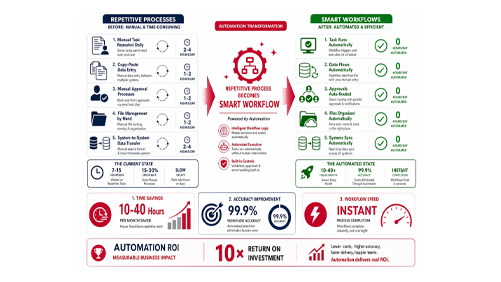
AI workflow automation creates value by improving the processes your team repeats every day. Instead of relying on employees to manually enter information, update systems, send follow-ups, or move tasks between departments, we design workflows that handle those steps automatically.

The goal isn’t to automate everything. We identify the areas where automation can remove the most friction, whether that’s reducing administrative work, keeping systems synchronized, speeding up lead handling, or making internal processes more consistent.

Our Approach to AI Workflow Automation

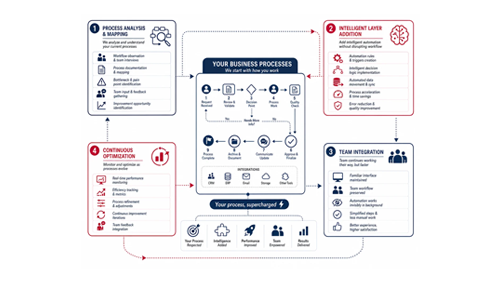
A successful automation starts with the process, not the software. We first understand how work currently moves through your business, then determine where AI and automation can make that process more efficient.
01

Map the Workflow

We examine the current process, identify repetitive steps, manual handoffs, bottlenecks, and tasks that depend on repeated data entry.
02

Define the Automation Logic

We determine what should trigger the workflow, what actions should happen automatically, and where human approval or intervention is still required.
03

Connect Your Systems

We integrate the workflow with the CRM, communication platforms, databases, scheduling tools, and other systems involved in the process.
04

Build and Test

We develop the automation and test it against different inputs, scenarios, and exceptions before putting it into everyday use.
05

Monitor and Improve

After launch, we review how the workflow performs and make adjustments as your business processes and requirements change.

Custom AI Workflow Automation vs. Standard Automation Tools

What Matters
Custom AI Workflow Automation
Standard Automation Tool
Workflow Design
Built around your specific processes, requirements, and business rules.
Uses predefined workflows and templates.
AI Capabilities
AI can classify, summarize, interpret, or process information within the workflow.
Primarily relies on fixed triggers and actions.
System Connections
Designed to connect the platforms your business actually uses.
Limited to supported integrations and available connectors.
Business Logic
Supports custom conditions, decisions, approvals, and escalation paths.
Usually offers more limited workflow logic.
Long-Term Flexibility
Can be expanded as your processes, systems, and automation needs evolve.
May require workarounds as requirements become more complex.
Optimization
Workflows can be monitored and refined based on actual business performance.
Typically limited to the features and updates provided by the platform.

Case Study: AI Workflow Automation for a Growing Business

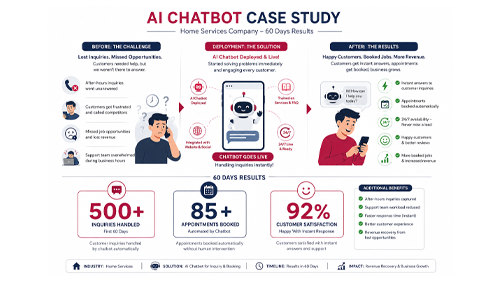
When a growing business found its team spending too much time on repetitive administrative tasks, disconnected systems, and manual follow-ups, we built an AI workflow automation solution around the way the company already operated.

The system connected key business tools, automated repetitive processes, and moved information between platforms without requiring employees to handle every step manually. From lead follow-ups and customer communication to internal data handling, automation reduced friction across everyday operations.

Within the first 60 days, the business saw measurable improvements in efficiency while giving its team more time to focus on higher-value work.
Hours saved per week through workflow automation
0 +
Business workflows automated
0 +
The implementation helped eliminate unnecessary manual work, improve response times, and create more consistent processes across the business. Instead of replacing the systems the company already relied on, the AI automation worked alongside them and connected the gaps between them.

Custom AI Workflow Automation vs. Standard Automation Tools

Data & Access Area

How We Handle It

AI Model Provider
Commercial API terms designed to prevent business data from being used for model training.
System Access
Only approved platforms, records, and data fields are connected to the automation.
Business Data
Information is accessed only when required for the workflows defined within the project scope.
Integration Permissions
Each connected system receives only the permissions required for its assigned automation tasks.
When Access Is Removed
Integration credentials can be revoked, stopping the automation from accessing connected systems.

Automate Your Workflows. Reduce Manual Work.

Tell us which repetitive tasks are slowing your team down. We’ll identify the workflows with the greatest automation potential, map the systems involved, and build a practical AI solution around your existing operations.

Frequently Asked Questions

Tasks that are repetitive, rule-based, time-sensitive, or require information to move between multiple systems are often strong candidates for automation.
Yes. Automation can be scaled to the size of your operation, starting with one or two high-impact processes and expanding as your needs grow.
Yes. Faster responses, timely follow-ups, accurate information, and smoother hand offs can create a more consistent customer experience.
We examine how tasks are currently completed, where information enters the process, which systems are involved, and where employees spend unnecessary time on manual work.
Yes. A single workflow can include multiple triggers, actions, conditions, system updates, notifications, and AI-powered steps.
Workflows are built with defined business rules, conditions, permissions, and escalation points. We also test different scenarios before deployment.
Yes. Multi-step workflows can coordinate tasks and information across different teams while directing each action to the appropriate person or system.
Only the information required to complete the defined workflow is connected. Access can be scoped around specific systems, records, and fields.
Yes. When systems support the required integrations, a workflow can use information from one platform to trigger an action in another.
Workflows can be monitored for successful actions, errors, delays, and other performance indicators so issues can be identified and addressed.
If a connected platform changes its functionality or integration requirements, the workflow may need to be updated. We can review and adjust affected automations to keep them operational.

We’ll Call You – Submit to Connect

Your request has been submitted successfully!

We’ll Text You – Submit to Start

Your request has been submitted successfully!

Let’s Connect via Email!

Powered by Alyne