

1. Introduction
Brief Overview of Zoho Marketing Automation
Zoho Marketing Automation is an all-in-one platform designed to streamline and enhance digital marketing efforts. It helps businesses manage campaigns, automate customer journeys, track engagement, and generate leads efficiently. The platform integrates seamlessly with Zoho CRM and other third-party tools, allowing marketers to create personalized and data-driven strategies.
With features like e-mail marketing list, social media marketing automation, lead nurturing, and analytics, Zoho Marketing Automation enables businesses to scale their marketing efforts while improving customer relationships.
Importance of Configuring General Settings for an Optimized Marketing Workflow
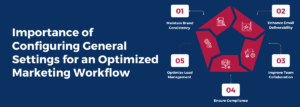
Setting up general settings in Zoho Marketing Automation is crucial for ensuring smooth and efficient marketing operations. Proper configuration allows businesses to:
Maintain Brand Consistency –
Setting up company details, email signatures, and sender addresses ensures all communications align with your brand identity.
Enhance Email Deliverability –
Configuring domain authentication (SPF, DKIM) helps prevent emails from landing in spam folders.
Improve Team Collaboration –
Assigning roles and permissions ensures the right team members have access to relevant features, enhancing workflow efficiency.
Ensure Compliance –
Managing data protection settings, including GDPR compliance and opt-in preferences, safeguards customer data and adheres to legal requirements.
Optimize Lead Management –
Defining lead scoring rules and distribution settings ensures that potential customers are properly segmented and nurtured.
By properly configuring these settings, businesses can maximize the effectiveness of their marketing campaigns, improve customer engagement, and streamline overall marketing operations.
2. Accessing General Settings in Zoho Marketing Automation
Configuring the General Settings in Zoho Marketing Automation is essential for optimizing how your marketing workflows operate. These settings help manage user roles, data protection, email configurations, and integrations, ensuring seamless execution of marketing campaigns.
Step-by-Step Guide to Navigating the Settings Panel
To access the General Settings in Zoho Marketing Automation, follow these steps:
-
Log in to Zoho Marketing Automation
-
-
Go to Zoho Marketing Automation and log in with your credentials.
-
-
Open the Settings Panel
-
-
On the Dashboard, locate the Settings icon (usually found in the top-right corner).
-
Click on it to open the General Settings menu.
-
-
Explore the Available Settings
-
-
Inside the Settings panel, you will find multiple sections categorized for managing different aspects of your marketing automation.
-
Key Sections Available Under General Settings

Zoho Marketing Automation provides various settings categories to configure your marketing operations efficiently. Here are the most important sections:
-
Organization Profile
-
-
Set up company details such as name, logo, and contact information.
-
Manage default sender addresses for emails.
-
-
User & Role Management
-
-
Add and manage users with different access levels.
-
Assign permissions based on roles (Admin, Marketer, Analyst, etc.).
-
-
Email Configuration
-
-
Configure sender email addresses and domain authentication (SPF, DKIM).
-
Manage email preferences, templates, and signatures.
-
-
Lead Management & Scoring
-
-
Define lead qualification criteria based on engagement.
-
Set up lead scoring rules to prioritize high-value prospects.
-
-
Privacy & Compliance Settings
-
-
Configure GDPR and opt-in preferences for email marketing.
-
Set up consent management to ensure compliance with data protection laws.
-
-
API & Integrations
-
-
Connect Zoho Marketing Automation with Zoho CRM and third-party applications.
-
Manage API keys and webhook configurations for automation.
-
-
Subscription & Notification Settings
-
-
Manage email subscription lists and notification preferences.
-
Configure alerts for campaign performance updates and user activities.
-
Why Accessing General Settings is Important
By properly configuring these settings, businesses can-
✔ Improve workflow efficiency by assigning roles and access permissions.
✔ Ensure brand consistency in email marketing and customer communications.
✔ Enhance marketing compliance with data protection and email regulations.
✔ Optimize lead tracking and scoring to maximize conversion potential.
By setting up Zoho Marketing Automation correctly, you create a strong foundation for executing successful marketing campaigns with minimal manual intervention.
3. Key General Settings to Configure in Zoho Marketing Automation
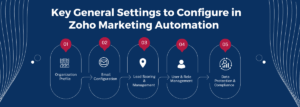
Setting up General Settings in Zoho Marketing Automation is crucial for ensuring your marketing efforts run smoothly. These settings help you maintain brand consistency, improve email deliverability, manage team access, and ensure compliance with data protection regulations. Below is a detailed breakdown of the essential settings you need to configure:
a) Organization Profile
The Organization Profile is where you define your company’s identity in Zoho Marketing Automation. This section ensures all your marketing communications reflect your brand accurately.
Setting up Company Details and Branding Preferences
-
Add your company name, logo, website, and contact information.
-
Ensure these details appear correctly in emails, landing pages, and reports.
-
Customize branding elements like colors and fonts for consistency across campaigns.
Managing User Roles and Permissions
-
Invite team members to collaborate within Zoho Marketing Automation.
-
Assign roles such as Admin, Marketer, or Analyst to control access levels.
-
Ensure only authorized users can modify critical settings or access sensitive data.
b) Email Configuration
Email marketing is a core function of Zoho Marketing Automation, and proper email setup ensures high deliverability rates and compliance with anti-spam policies.
Setting up Email Senders and Domain Authentication (SPF, DKIM)
-
Add and verify your company’s email address to send marketing emails.
-
Set up SPF (Sender Policy Framework) and DKIM (DomainKeys Identified Mail) to authenticate your emails and prevent them from landing in spam.
-
Improve email credibility and increase inbox placement by configuring these authentication records.
Configuring Email Templates and Signature Settings
-
Create custom email templates that align with your brand style.
-
Set up default email signatures to maintain consistency in all outbound communications.
-
Use dynamic fields to personalize emails based on recipient details.
c) Lead Scoring & Management
Lead management helps prioritize high-quality leads while filtering out less engaged prospects. Configuring this section allows your team to focus on leads most likely to convert.
Defining Lead Qualification Criteria
-
Establish a lead scoring model based on actions such as email opens, link clicks, and website visits.
-
Assign scores to different engagement levels (e.g., a lead who downloads an eBook gets +10 points, while one who unsubscribes loses -10 points).
-
Set thresholds to define when a lead is “Sales-Qualified” and ready for follow-up.
Automating Lead Distribution Based on Engagement
-
Automatically assign high-scoring leads to the sales team.
-
Segment leads into different nurture campaigns based on their score.
-
Use behavioral tracking to move leads through the sales funnel efficiently.
d) User & Role Management
Managing users and access levels ensures that the right team members have appropriate permissions while protecting sensitive data.
Adding and Managing Users
-
Invite marketers, analysts, and managers to collaborate on campaigns.
-
Set up user profiles with their contact details and roles.
-
Restrict or grant access to specific modules based on responsibilities.
Assigning Permissions and Access Control
-
Assign roles like Admin (full access), Marketer (campaigns only), or Viewer (read-only access).
-
Limit access to financial reports, lead data, or API settings to prevent unauthorized changes.
-
Regularly review user permissions to maintain security and efficiency.
e) Data Protection & Compliance
With increasing regulations around data privacy, ensuring your marketing efforts comply with legal requirements is essential.
GDPR & Privacy Settings
-
Enable GDPR compliance for European customers by setting up explicit consent options.
-
Allow contacts to manage their subscription preferences easily.
-
Maintain an audit log of consent history for compliance purposes.
Setting up Opt-In and Consent Management
-
Implement double opt-in to ensure subscribers actively confirm their interest.
-
Display clear privacy policies on signup forms to inform users about data usage.
-
Set up automated workflows to remove non-compliant or inactive contacts from your list.
4. Integrations & API Configurations in Zoho Marketing Automation
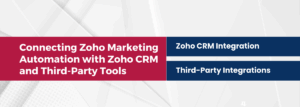
Integrations play a crucial role in maximizing the capabilities of Zoho Marketing Automation by enabling seamless data flow between different platforms. Whether you want to connect Zoho CRM, third-party applications, or build custom automation using APIs, properly configuring integrations ensures your marketing processes are efficient and data-driven.
Connecting Zoho Marketing Automation with Zoho CRM and Third-Party Tools
Zoho CRM Integration
-
Sync leads, contacts, and deals between Zoho Marketing Automation and Zoho CRM.
-
Automatically update customer profiles based on their engagement with emails, campaigns, and forms.
-
Enable lead scoring and nurturing directly from the CRM to prioritize high-intent prospects.
-
Automate follow-up actions by triggering workflows based on customer interactions.
Third-Party Integrations
-
Email & SMS Marketing-
Connect with email providers like Mailchimp, SendGrid, or Twilio for SMS campaigns.
-
Web Analytics & Tracking-
Integrate Google Analytics, Facebook Pixel, and UTM tracking for performance insights.
-
Social Media & Advertising-
Sync with Facebook Ads, LinkedIn, and Google Ads to track ROI and retarget audiences.
-
Web Forms & Landing Pages-
Embed lead capture forms on your website using integrations with WordPress, Wix, and custom-built sites.
-
E-commerce & Payment Platforms-
Link Zoho Marketing Automation with Shopify, WooCommerce, and Stripe for personalized marketing campaigns.
API Keys and Webhook Settings
For businesses that require custom automation or advanced integrations, Zoho Marketing Automation’s API and webhook capabilities allow seamless data exchange with other software.
API Keys
-
What is an API Key?
API keys act as unique credentials that allow external applications to communicate with Zoho Marketing Automation.
-
How to Generate an API Key?
-
-
Go to Settings > Developer Space > API Keys.
-
Generate a new key and set access permissions.
-
Use this key to authenticate requests when integrating with custom applications.
-
-
Common Use Cases for API Integration
-
-
Automate lead capture from external websites.
-
Push data from custom-built CRM systems to Zoho Marketing Automation.
-
Retrieve campaign performance metrics for custom reporting dashboards.
-
Webhook Settings
What is a Webhook?
A webhook in Zoho Marketing Automation is a mechanism that enables real-time data sharing between applications whenever a specific event takes place. Unlike traditional API requests that require constant polling for updates, webhooks automatically push data to an external system when triggered. For example, if a new lead submits a form, a webhook can instantly send that lead’s details to a CRM, email marketing tool, or messaging platform like Slack. This ensures seamless automation, reduces manual effort, and enables businesses to respond to customer actions in real time.
-
How to Set Up a Webhook?
-
-
Go to Settings > Developer Space > Webhooks.
-
Create a new webhook and define the event triggers (e.g., new lead added, email opened, form submitted).
-
Enter the webhook URL where the data should be sent (e.g., your CRM or custom app).
-
Test the webhook to ensure data is received correctly.
-
-
Common Use Cases for Webhooks
-
-
Notify a sales team when a high-scoring lead is detected.
-
Update customer records in real-time when they interact with an email campaign.
-
Trigger a Slack or WhatsApp notification when a contact signs up for a webinar.
-
5. Best Practices for Optimizing General Settings in Zoho Marketing Automation

Setting up General Settings in Zoho Marketing Automation is just the beginning. To ensure long-term efficiency and effectiveness, it’s essential to regularly review and optimize these settings. Below are three key best practices to follow:
Regularly Updating Organization Details
Your company’s profile information—such as name, logo, contact details, and branding elements—should always be up to date. Any changes in business address, domain, or sender email addresses should be reflected in Zoho Marketing Automation to maintain consistency in campaigns and communications. Keeping this information accurate ensures brand credibility, prevents email deliverability issues, and aligns with customer expectations.
Ensuring Compliance with Email Marketing Regulations
Email marketing laws, such as GDPR, CAN-SPAM, and CCPA, require businesses to follow specific rules to protect user privacy. To stay compliant, always configure opt-in and consent management settings, enable double opt-in for new subscribers, and provide clear unsubscribe options in all emails. Additionally, setting up SPF, DKIM, and DMARC authentication improves email deliverability and prevents spam filtering. Regularly reviewing compliance settings helps avoid legal risks and ensures that marketing emails reach the intended audience.
Maintaining Clean and Structured Lead Management
An organized lead management system improves targeting, engagement, and conversion rates. Regularly clean your lead database by removing duplicate, inactive, or invalid contacts to improve email deliverability and reporting accuracy. Implement a strong lead scoring model to prioritize high-quality leads and automatically assign them to sales or nurture campaigns. Keeping your lead data structured and up to date allows for better segmentation, personalization, and overall marketing efficiency.
By following these best practices, businesses can ensure that their Zoho Marketing Automation settings remain optimized, compliant, and effective in driving marketing success.
Conclusion
Configuring the General Settings in Zoho Marketing Automation is essential for ensuring smooth marketing operations, improving email deliverability, and maintaining compliance. From setting up your organization profile and managing user roles to optimizing email authentication, lead scoring, and integrations, every setting plays a crucial role in streamlining workflows and enhancing campaign performance.
To maximize efficiency, it’s important to regularly audit and refine these settings. Keeping your organization details updated, ensuring compliance with email marketing laws, and maintaining a clean, structured lead database will help your marketing efforts stay effective and scalable. By continuously optimizing your settings, you can improve engagement, enhance automation, and drive better results from your marketing campaigns.
